
Let's put those Korean merchants on the map!
Great to see you here. Below you'll find everything you need to map Korean businesses that accept Bitcoin payments. Work at your own pace, aim for quality over quantity. Feel free to ask any questions on Matrix, and most of all: have fun while mapping!
What you'll need
- A computer with two monitors (makes life easier)
- Access to OpenStreetMap (OSM), Gitea and Matrix
- Access to Facebook & Instagram for quick verifications
- Some OSM tagging experience, or the willingness to read our guide
- A careful eye and a bit of perseverance
Tip: use the same handle on OSM, Gitea and Matrix so we can ping you quickly if something looks odd
If you'd like, we'll pair you with a buddy who will walk you through tagging your very first ticket.
Want to help? Please complete the Become a Tagger form.
Before you start
Pop into the Matrix #shadowy-supertaggers channel and say hi. We'd love to get to know you a bit before you dive in.
Step-by-step workflow
1. Log in to Gitea
2. Pick a ticket
Open any open Korean issue (marked with a “kr” label) → click “Assignees” on the right → choose yourself
Or click this link to automatically sort all Korean tickets.
3. Verify the merchant
Just like Bitcoin, it's "don't trust but verify". Search engines, the company website, Facebook and Instagram are your friends. Rule of thumb: website data wins.
4. Check OSM
Click the “OpenStreetMap editor link” in the Gitea ticket.
Zoom in/out to see if the place is already mapped.
Already there?
Verify all the existing tags (if possible) when adding Bitcoin tags to an existing location.
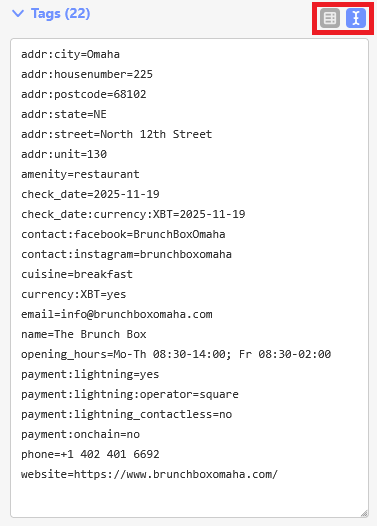
Add the following tags:
check_date:currency:XBT=
check_date=
currency:XBT=yes
payment:lightning=yes
payment:lightning_contactless=no
payment:onchain=no
Toggle between list and text views to speed up your workflow.
Not there yet?
Only brick-and-mortar shops, cafés, offices, or other publicly accessible venues belong on OSM, purely online stores don't. If the pin drops in what looks like a house, and you can't spot a shop-front, logo, or street-level sign, please mark the ticket as rejected in Gitea. If the address looks residential but is clearly shown on the company website, go ahead and add it. When a clear storefront or office sign is visible, map away!
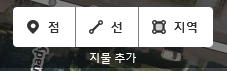
Click "Point" in the OSM web editor and drop it on the correct doorstep.
Choose the most fitting category (restaurant, hairdresser, coffeehouse, café etc.).
Need help picking the right category? Take a look here.
Add name
Normal case, no ALL-CAPS (drop legal suffixes like Jusik Hoesa, Yuhan Hoesa, Hapja Hoesa, Hapdong Hoesa and Yuhan Chaeg-im Hoesa).
Add name (English)
Click "+" and select English in the "Choose language" box
Add full address
Province, City, District, Town, Subdistrict, Street, House number, Unit (if provided) and Postcode.
Add phone number
Use syntax +82 1 234 5678
Add email
Use syntax in all lowercase
Add opening hours
The correct syntax for opening hours is explained here. Use Yo Hours and the opening hours evaluation tool to build the string.
Add website
Optional extras if listed:
contact:facebook=
contact:instagram=
5. Upload to OSM
Click “Save” in the upper right-hand corner.
Use a changeset comment such as
#btcmap Merchant added
or
#btcmap Bitcoin tags added
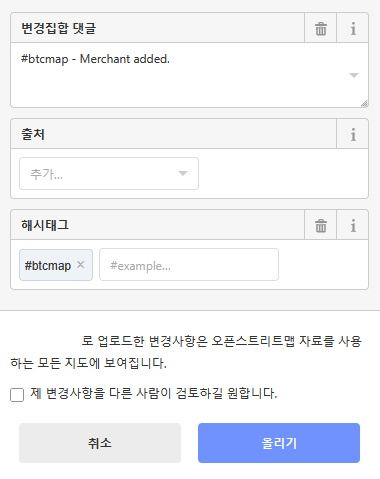
Click "Upload"
Copy the node URL, you'll need it in the final step.
Click the link behind "Your changeset #:"
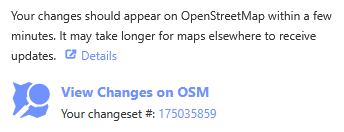
Copy the link below "Nodes"
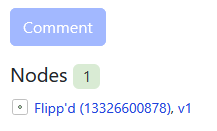
6. Close the ticket
Past the URL (from step 5) into the Gitea ticket comment section → click “Close with comment”.
That's it, time for the next one!
Other tags explained
check_date=
This indicates the date when all present tags were verified using local knowledge or by cross-checking the company's website. Use the ISO date format YYYY-MM-DD.
check_date:currency:XBT=
Update this tag with the most recent verified Bitcoin payment made. Use the ISO date format YYYY-MM-DD.
survey:date=
Use this tag when the location has been physically verified in person by you. Use the ISO date format YYYY-MM-DD.
description=
This tag can be used to provide additional information about the related element (visible to the end user and shown on BTC Map). Keep it short, a few words or maybe one to three sentences at most. Only neutral and factual information is allowed. Do not include subjective evaluations, for example "the best restaurant in town". Do not use the tag for advertising messages.
note=
Use this tag to leave a general comment to an object to let other mappers know about non-visible details, such as "30 km/h speed limit during school hours". Rarely used on BTC Map (not visible to the end user and not shown on BTC Map).
fixme=
The fixme tag is intended for mappers to indicate problems or incompleteness that need to be resolved. The editor will display a prominent yellow warning box to alert you to help resolve the issue. The main difference is that fixme= is a call to action (something is wrong or missing), whereas note= often provides context or explanation. Once the problem has been fixed and the tags have been corrected or supplemented, the fixme= tag should be removed.
Example: When a location's position is just a rough approximation and not accurate enough for users navigating to a place that accepts Bitcoin (such as an ATM or merchant).
branch=
It records the local name of a specific outlet of a chain or brand.

- Home
- Table of Contents
- Quicklinks: